
Search for answers or browse our documentation.
BTS Supplier CSV Imports
Import Additional BTS Customer Data
A CSV (Comma Separated Value) file – with a format that is determined by Source IT – is used to import the required extra Supplier banking details into BTS.
The following BTS bank formats cater for this facility:
- Business Integrator (ABSA)
- Business Integrator Online (ABSA)
- CSV (First National)
- Local PayBulk (Barclays)
- Barclays.net UK (Barclays)
The screen of this program is as per Figure 1
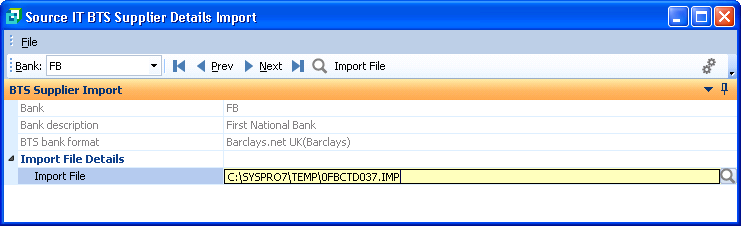
Figure 1
Bank – a valid SYSPRO Bank will need to be entered on the toolbar and can be browsed and selected. If the bank entered does not have a BTS format that is handled by this program, an error will be seen
Import File – this must contain the full path as well as the name of the file being imported. This will be validated and can be browsed and selected.
When the “Import File” button is selected from the main toolbar, the process will translate the file and perform the associated validation.
The validation process will stop at the first line that contains an error and the associated line number of the imported file will be displayed with a message representing the reason for failure.
The line in error on the import file must be corrected and then import process initiated again.
Business Integrator (ABSA)
This is the import layout for ABSA Business Integrator (BTIFOC) BTS import.
The Comma Separated Value (CSV) layout must be:
- Source 2 characters, either AP or CB
- Supplier code maximum 15 characters
- Account number maximum 16 numeric characters
- Bank Branch maximum 6 numeric characters
- Bank Account Type 1,2,3,4 or 5 (explanation below)
- Statement narration maximum 30 characters
Bank Account Type:
1 – Current Account
2 – Savings Account
3 – Transmission Account
4 – Subscription Shares
Here are 2 CSV entries with a heading descriptor which must be removed:
Source (2), Supplier Code (15), Account Number (16), Bank Branch (6), Bank Account Type (1), Statement Narration (30)
AP,000000000000001,2345678,12345,1,Testing statement
CB,1,87612393,001432,2,Re-Testing statement
Business Integrator Online (Absa)
This is the import layout for ABSA Business Integrator Online (BTIABC) BTS import.
The Comma Separated Value (CSV) layout must be:
- Source 2 characters, either AP or CB
- Supplier code maximum 15 characters
- Payment type maximum 5 characters
- Type details maximum 70 characters
- Contact name maximum 50 characters
- Additional comments maximum 100 characters
- Statement reference maximum 20 characters
Payment Types:
• EMAIL
• SMS
• FAX
• NONE
Rules are:
• Statement reference is always mandatory for all records
• If Payment Type is NONE, the other fields must be empty
• If Payment type is any of the other 3 options, all fields are mandatory
Note that the header record is assumed to be at the top of this import file and the first record will be ignored.
Here is a CSV entry with a heading descriptor which must be present and is ignored:
Source (2),Supplier code (15),Payment type (5),Type details (70),Contact name (50),Additional comments (100),Statement reference (20)
AP,000000000000012,FAX,0117810602,JAMES,ADD,DESCRIPTION
CSV (First National)
This is the import layout for CSV First National (BTIFNC) BTS import to populate the additional information as prompted by BTS for existing SYSPRO Suppliers. This only updates the associated BTS tables.
The Comma Separated Value (CSV) layout must be showing maximun characters used:
- Source 2 characters, either AP or CB
- Supplier code 15 characters
- Email 1 notify 40 characters
- Email 1 address 200 characters
- Email 1 subject 50 characters
- Email 2 notify 40 characters
- Email 2 address 200 characters
- Email 2 subject 50 characters
- Email 3 notify 40 characters
- Email 3 address 200 characters
- Email 3 subject 50 characters
- Email 4 notify 40 characters
- Email 4 address 200 characters
- Email 4 subject 50 characters
- Email 5 notify 40 characters
- Email 5 address 200 characters
- Email 5 subject 50 characters
- SMS 1 notify 40 characters
- SMS 1 code 20 characters
- SMS 1 number 40 characters
- SMS 2 notify 40 characters
- SMS 2 code 20 characters
- SMS 2 number 40 characters
- FAX 1 notify 40 characters
- FAX 1 code 20 characters
- FAX 1 number 40 characters
Here is a CSV heading descriptor entry which must be removed:
Source (2), Supplier Code (15), Email 1 notify (40), Email 1 address (200), Email 1 subject (50), Email 2 notify (40), Email 2 address (200), Email 2 subject (50), Email 3 notify (40), Email 3 address (200), Email 3 subject (50), Email 4 notify (40), Email 4 address (200), Email 4 subject (50), Email 5 notify (40), Email 5 address (200), Email 5 subject (50), SMS 1 notify (40), SMS 1 code (20), SMS 1 number (40), SMS 2 notify (40), SMS 2 code (20), SMS 2 number (40), FAX 1 notify (40), FAX 1 code (20), FAX 1 number (40),
Local PayBulk (Barclays)
This is the import layout for Local Paybulk – Barclays (BTIBPB) BTS import to populate the additional information as prompted by BTS for existing SYSPRO Suppliers. This only updates the associated BTS tables.
The Comma Separated Value (CSV) layout must be showing maximun characters used:
- Source 2 characters, either AP or CB
- Supplier code 15 characters
- Payment identifier (PI) 2 characters (“DD”, “SW”, “OW”, “IN”, “LO”)
- Display code 8 characters (must be entered if PI = “OW”)
- SWIFT code 11 characters (must be entered if PI = “SW”)
- Charge option 3 characters (“SHA”, “BEN”, “OUR” must be entered if PI = “SW”)
- Beneficiary name 35 characters
- Benficiary address line 1 100 characters (must be entered if PI = “DD”)
- Beneficiary address line 2 100 characters (must be entered if PI = “DD”)
- Beneficiary address line 3 100 characters (must be entered if PI = “DD”)
- Beneficiary phone number 11 characters (must be entered if PI = “DD”)
- Recipient name 35 characters (must be entered if PI = “DD”)
- Recipient address line 1 35 characters (must be entered if PI = “DD”)
- Recipient address line 2 35 characters (must be entered if PI = “DD”)
- Recipient address line 3 35 characters (must be entered if PI = “DD”)
- Recipient city 25 characters (must be entered if PI = “DD”)
- Recipient pin code 8 characters (must be entered if PI = “DD”)
- DD pay at location 35 characters (must be entered if PI = “DD”)
- Beneficiary bank 100 characters (must be entered if PI = “SW” or “LO”)
- Beneficiary city 100 characters
- Beneficiary country 100 characters
- Intermediary SWIFT code 11 characters
- Intermediary account number 34 characters
- Intermediary bank 35 characters
- Intermediary bank address 1 35 characters
- Intermediary bank address 2 35 characters
- Remittance info 1 35 characters
- Remittance info 2 35 characters
- Remittance info 3 35 characters
- Remittance info 4 35 characters
- Nominated bene 1 character
- Purpose of payment 50 characters (must be entered if PI = “SW”)
- International branch code 50 characters (must be entered if PI = “SW”)
- Account number 32 characters (must be entered if PI = “LO”)
Barclays.net UK (Barclays)
This is the import layout for Barclays.net – Barclays (BTIBNU) BTS import to populate the additional information as prompted by BTS for existing SYSPRO Suppliers. This only updates the associated BTS tables.
The Comma Separated Value (CSV) layout must be showing maximun characters used:
- Source 2 characters, either AP or CB
- Supplier code 15 characters
- BIC 11 characters
- Account number 34 characters
- Reference 25 characters
- Charges 3 characters (“OUR”, “SHA’, “BEN”)
- Supplier name 35 characters